
Plans & billingप्लान और बिलिंग
Compare the plans, see what you pay NxAi and what Meta bills, and find your payments.
प्लान्स की तुलना कीजिए, समझिए कि NxAi को क्या और Meta को क्या देना है, और पेमेंट्स कहाँ मिलते हैं।
Transcript
0:00Welcome
Welcome to NxAi tutorials! In this episode, we'll look at plans and billing: choosing a plan, what you pay for, and where to find your payments and invoices.
0:12What you'll see
We'll compare the plans, see who you pay for what, walk through the billing page, and finish with the wallet and invoices.
0:21Manage plan: compare the plans
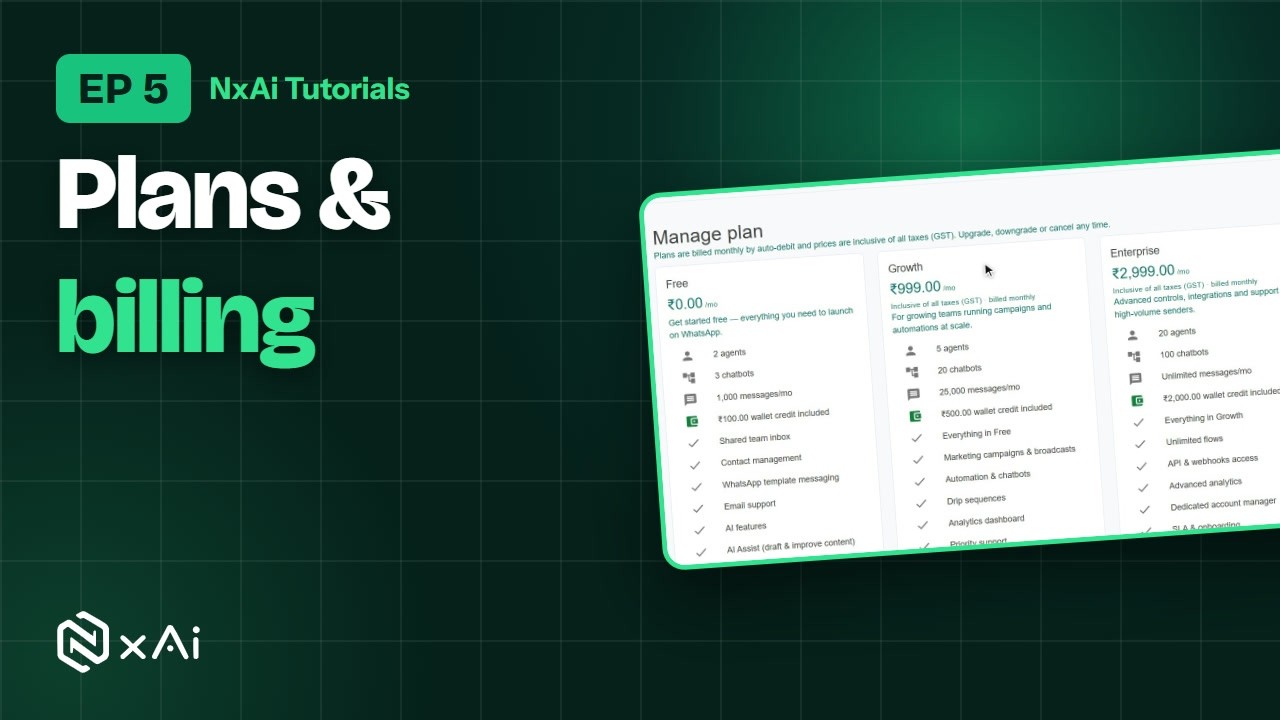
In the menu, open Billing, payments & plans, and click Manage plan. Here are the plans side by side: how many team members, chatbots and messages each one includes, the wallet credit that comes with it, and its features. Prices are monthly and include GST.
0:41Change your plan
Each plan also lists its AI features. To change your plan, click Subscribe on the one you want. You pay monthly by auto-debit, with UPI, card or net banking, and you can cancel any time. You keep the plan until the end of the month you've paid for.
0:58What you pay for, and to whom
Below the plans, NxAi explains what you pay for, and to whom. Your NxAi plan covers the platform, team seats and features. WhatsApp messages are billed by Meta, directly to your WhatsApp Business account. Those are the funds you added in episode three. And the NxAi wallet is a prepaid balance for usage add-ons, like AI replies.
1:22Billing overview & usage
Now open Billing & payments. The Overview shows your current plan and when it renews, your usage this period, like team seats, chatbots and messages, what's due next, your wallet balance, and your recent invoices.
1:40Payments
The Payments tab lists every plan payment and wallet top-up, with its status and invoice. When a payment is due, you can pay it from here.
1:52Wallet & top-ups
The Wallet pays for NxAi's usage charges, such as AI, never for WhatsApp messages. To add credit, pick an amount and click Top up. You get a GST invoice for every top-up, and the wallet activity shows every credit and charge.
2:08Plan history & invoices
Plan history records every plan change, and Invoices keeps all your GST invoices, ready to download.
2:21Next episode
In the next episode, we'll add and import your contacts. If this video helped, subscribe, and see you in the next one!
ट्रांसक्रिप्ट
0:00स्वागत
NxAi ट्यूटोरियल्स में आपका स्वागत है! इस एपिसोड में हम प्लान और बिलिंग देखेंगे: प्लान कैसे चुनें, आप किस चीज़ का पेमेंट करते हैं, और आपके पेमेंट्स और इनवॉइस कहाँ मिलते हैं।
0:14इस एपिसोड में
हम प्लान्स की तुलना करेंगे, देखेंगे कि किस चीज़ का पेमेंट किसे होता है, बिलिंग पेज देखेंगे, और आख़िर में वॉलेट और इनवॉइस।
0:24Manage plan: प्लान्स की तुलना
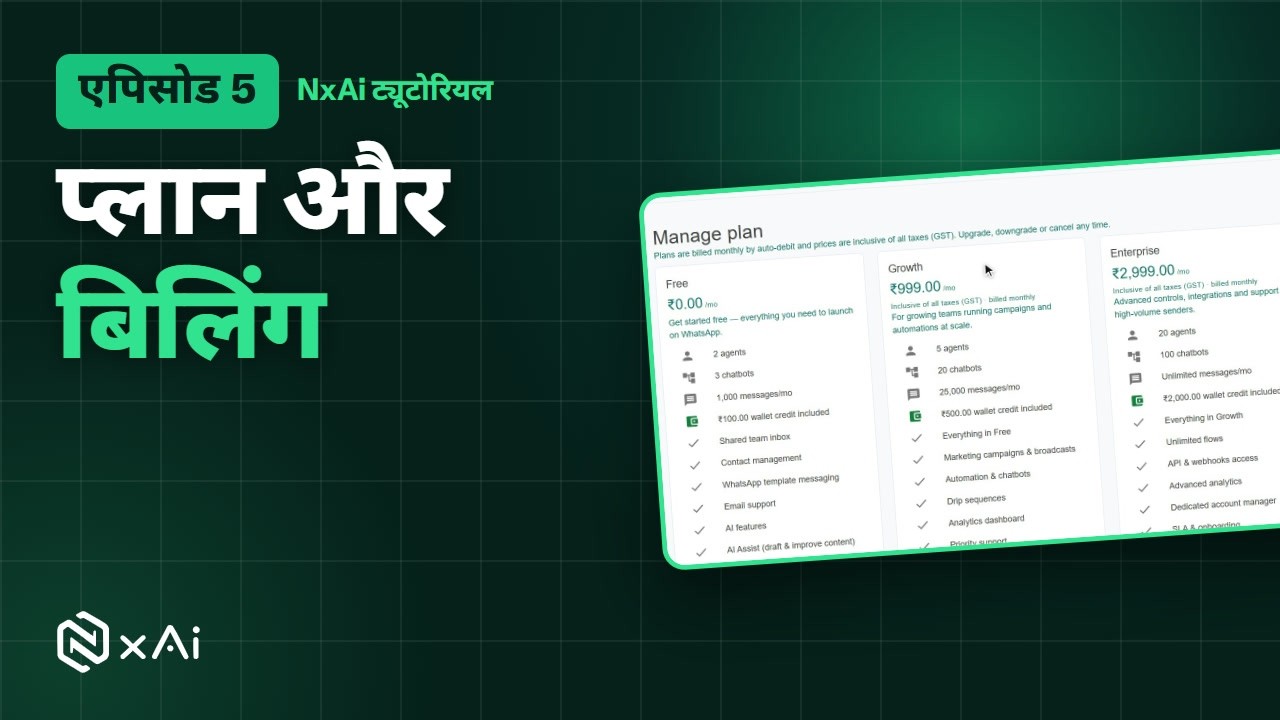
मेन्यू में Billing, payments & plans खोलिए, और Manage plan पर क्लिक कीजिए। यहाँ सारे प्लान साथ-साथ दिखते हैं: हर प्लान में कितने टीम मेंबर्स, चैटबॉट्स और मैसेज हैं, साथ में कितना वॉलेट क्रेडिट मिलता है, और कौन-से फ़ीचर्स हैं। क़ीमतें महीने की हैं और इनमें GST शामिल है।
0:44प्लान बदलिए
हर प्लान में उसके AI फ़ीचर्स भी लिखे हैं। प्लान बदलने के लिए जो प्लान चाहिए उस पर Subscribe पर क्लिक कीजिए। पेमेंट हर महीने ऑटो-डेबिट से होता है — UPI, कार्ड या नेट बैंकिंग से — और आप कभी भी कैंसल कर सकते हैं। जिस महीने का पेमेंट हो चुका है, उसके आख़िर तक प्लान चलता रहता है।
1:05किसका पेमेंट किसे
प्लान्स के नीचे NxAi बताता है कि आप किस चीज़ का पेमेंट किसे करते हैं। आपका NxAi प्लान प्लेटफ़ॉर्म, टीम सीट्स और फ़ीचर्स के लिए है। WhatsApp मैसेज का बिल Meta सीधे आपके WhatsApp Business अकाउंट से बनाता है — ये वही फ़ंड्स हैं जो आपने एपिसोड तीन में जोड़े थे। और NxAi वॉलेट एक प्रीपेड बैलेंस है, AI रिप्लाई जैसे यूसेज ऐड-ऑन्स के लिए।
1:36बिलिंग ओवरव्यू और यूसेज
अब Billing & payments खोलिए। Overview में आपका मौजूदा प्लान और वह कब रिन्यू होगा, इस अवधि का यूसेज — जैसे टीम सीट्स, चैटबॉट्स और मैसेज — अगला पेमेंट, आपका वॉलेट बैलेंस, और हाल के इनवॉइस दिखते हैं।
1:53पेमेंट्स
Payments टैब में हर प्लान पेमेंट और वॉलेट टॉप-अप, उसके स्टेटस और इनवॉइस के साथ दिखता है। जब पेमेंट ड्यू हो, तो आप उसे यहीं से कर सकते हैं।
2:06वॉलेट और टॉप-अप
वॉलेट से NxAi के यूसेज चार्ज कटते हैं, जैसे AI — WhatsApp मैसेज के नहीं। क्रेडिट जोड़ने के लिए रक़म चुनिए और Top up पर क्लिक कीजिए। हर टॉप-अप पर आपको GST इनवॉइस मिलता है, और वॉलेट ऐक्टिविटी में हर क्रेडिट और चार्ज दिखता है।
2:26प्लान हिस्ट्री और इनवॉइस
Plan history में हर प्लान बदलाव दर्ज रहता है, और Invoices में आपके सारे GST इनवॉइस, डाउनलोड के लिए तैयार।
2:39अगला एपिसोड
अगले एपिसोड में हम आपके कॉन्टैक्ट्स जोड़ेंगे और इम्पोर्ट करेंगे। अगर यह वीडियो काम का लगा, तो चैनल सब्सक्राइब कीजिए — मिलते हैं अगले एपिसोड में!

Ready to try it on your own number?
Start free and follow along. We help you set up the first bot, template and campaign.
3 months free · No credit card required · Free onboarding
